It is Thursday afternoon and you signed a new client on Monday. You still cannot start. You have the agreement, but you are missing her proof of address. You texted her for it Tuesday, she replied with a photo of a water bill so dark you cannot read the account number, and you have not followed up because you were on calls. Her file has been sitting on “waiting for docs” for three days, the dispute round that should already be out the door is not, and she is starting to wonder what she paid for.
That gap, between the signed agreement and the moment you actually have everything you need to work the file, is where small credit-repair firms lose their first week with every client. The documents are not hard to get. Getting them in once, legible, in a place that is not your personal inbox, and without chasing the client five times, is the hard part.
The answer up front: stop collecting documents over email and text, and stop collecting them by memory. Build one secure request that sends the client a single upload link, shows them exactly which files you need for their situation, chases the missing ones on a timer, and drops everything into their record. You turn a three-day stall and a security liability into a step that finishes itself.
One line before anything else: this post is about intake operations and data handling. Nothing here disputes an item, decides what to challenge, or promises a result. That stays with you, the firm.
Table of contents
- What collecting documents by email actually costs you
- The documents you actually need, and why
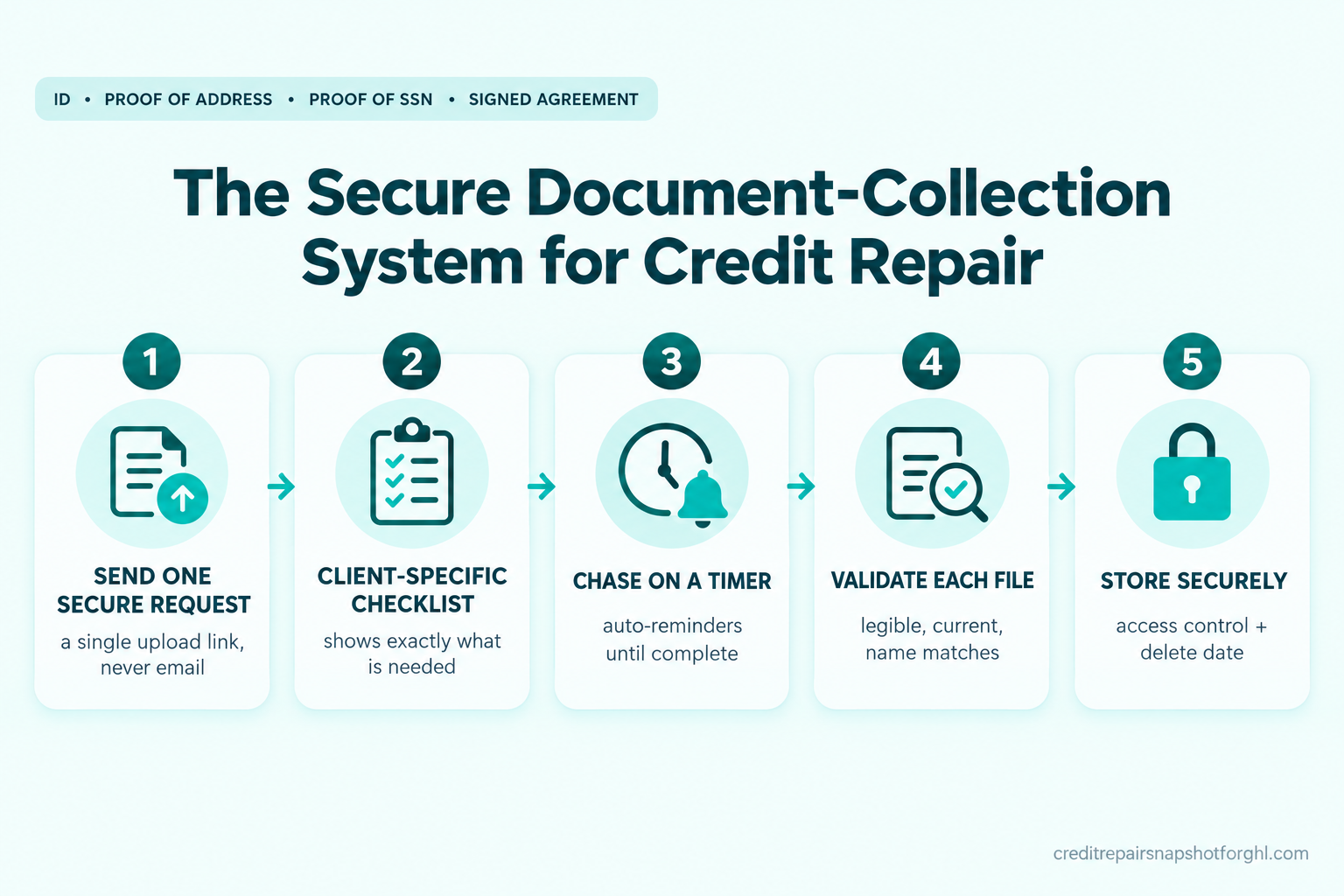
- The five-stage secure document-collection system
- Stage 1: Send one secure request, not a thread
- Stage 2: Show a checklist built for that client
- Stage 3: Chase the missing files on a timer
- Stage 4: Validate every file before you accept it
- Stage 5: Store it with access control and a delete date
- The same system at three sizes
- The compliance layer you cannot skip
- Objections
- FAQ
What collecting documents by email actually costs you
There are two costs, and most operators only feel the first one.
The first cost is time. Think about a single new client. You ask for documents. They send one of three. You ask again for the rest. They send a blurry photo. You ask for a clearer one. They go quiet for two days. You text. They reply at 9pm when you are not working. By the time you have a clean, complete set, four or five days have passed and you have sent six messages, none of which you can find in order. Multiply that by every client who signs this month and you have lost the better part of a workweek to chasing paper, not working files.
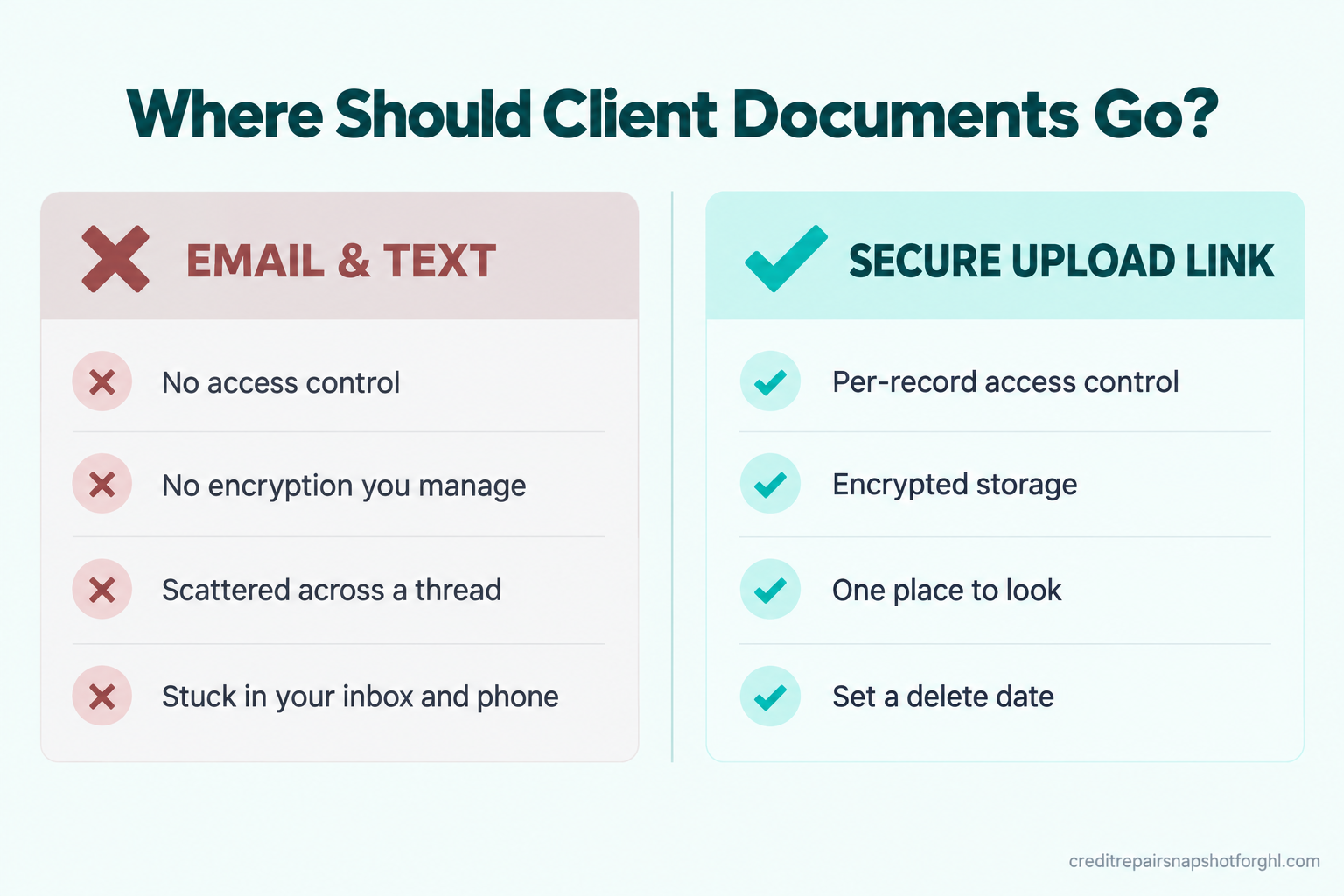
The second cost is the one that can end a business. A photo ID, a Social Security card image, and a utility bill are exactly the information an identity thief wants, and when you collect them over email and text they end up sitting in your personal inbox and your phone’s photo roll. That is sensitive personal data for dozens of people, stored with no access control you manage, no encryption you control, and no plan for deleting it. One phished password or one lost phone exposes every client at once.
The numbers on what a breach costs are not small-business numbers, but they tell you how seriously the rules treat this kind of data.
The United States average breach cost rose about 9% to $10.22 million in 2025, driven in part by higher regulatory penalties, while the global average fell to $4.44 million (IBM Cost of a Data Breach Report 2025). You are not IBM, and no thief is coming for a two-person shop to collect eight figures. The point is the direction of the rules: regulators now treat exposed consumer financial data as expensive, and they expect the business holding it to have guarded it on purpose.
Average cost of a data breach, in millions of USD. Source: IBM Cost of a Data Breach Report 2025.
The fix is not to collect fewer documents. You need them. The fix is to collect them through one secure channel you control, and to make the whole thing run on a schedule instead of your memory.
The documents you actually need, and why
Before you build anything, get clear on what you are collecting and why, because “send me your documents” is vague and vague requests come back half-done.
Most credit-repair intakes need four things. A government-issued photo ID, to confirm the person is who they say they are. Proof of their current address, usually a utility bill or lease dated in the last 60 days, because the bureaus and monitoring services match on address and a mismatch stalls everything. Proof of their Social Security number, because the same matching logic applies. And the signed service agreement with the required disclosures, which is a document you send them, not one they send you.
You collect these for identity verification and for clean matching when the client enrolls in credit monitoring, which is how most firms get report data in the first place. The monitoring service pulls the report based on the consumer’s own authorization, so the documents that confirm identity are what let that enrollment go through without a hold. If you want the full picture of how report data gets into your system, our guide on connecting credit monitoring to your CRM walks the pulls, the permissible purpose, and the import.
A note that saves a lot of pain: you do not need more than this to start, and asking for more than you need is both a compliance risk and a reason clients stall. Collect what the work requires. Nothing extra.
The five-stage secure document-collection system
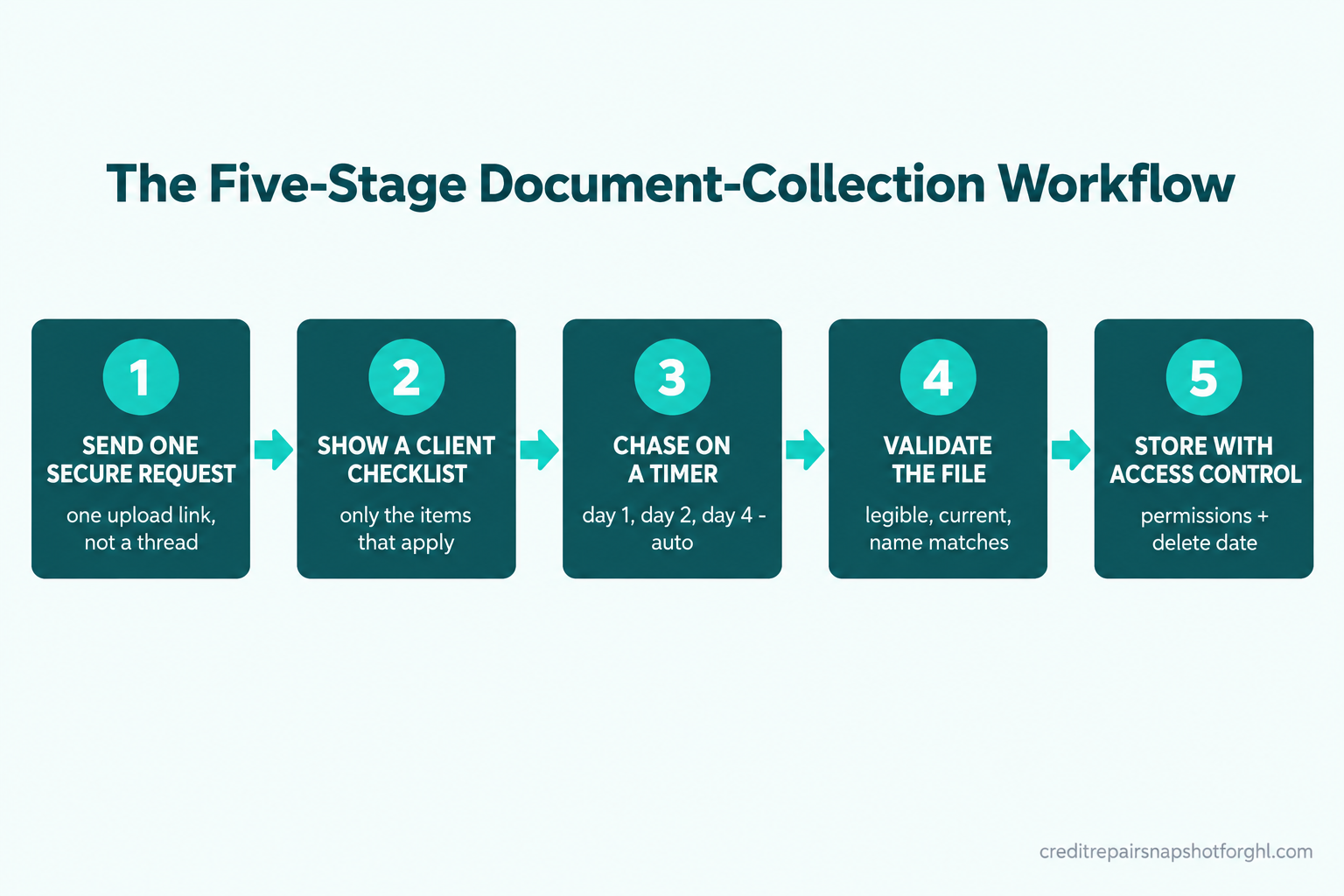
The whole system is five stages, and each one removes a specific failure that an email thread causes.
- Send one secure request with a single upload link, so documents never touch email or text.
- Show a checklist built for that client, so they see exactly what is needed and what is still missing.
- Chase the missing files on a timer, so you never personally remember to follow up.
- Validate every file before you accept it, so a blurry ID is caught on day one, not day five.
- Store it with access control and a delete date, so the data is guarded while you need it and gone when you do not.
You can build all five inside GoHighLevel using a form, a file-upload field, a workflow, and a client record, or inside any CRM that does secure uploads and timed follow-up. The platform matters less than the fact that all five stages exist. Here is each one, how to set it up, the copy to use, and how it breaks.
Stage 1: Send one secure request, not a thread
The moment the agreement is signed, the client should get one message with one link. That link opens a secure upload page, not a reply-with-attachments email. The difference is everything: an upload page stores the file in a system with access control, keeps it off your inbox and phone, and gives you one place to look instead of a scattered thread.
Set it up as a single intake form with file-upload fields, hosted behind the client’s login or a unique secure link. The form lives in your CRM, the files land on the client’s record, and the link is specific to that client so documents cannot land on the wrong file.
Here is the request message. Keep it short, tell them why, and set the expectation that this is the thing standing between them and the work starting.
How it breaks. The two common failures are clients who reply to the message with photos attached instead of using the link, and clients who open the link on a phone and give up because the form is long. Fix the first by having the workflow catch any inbound attachment and auto-reply with the link again and a one-line “for your security, please use the upload page, not email.” Fix the second by keeping the form to the four fields and nothing else. Every extra field is a client who does not finish.
Stage 2: Show a checklist built for that client
A generic “upload your documents” request gets generic results. A checklist that shows the specific items, marks each one done as it comes in, and shows what is still missing gets a complete set, because people finish lists they can see.
Build the upload page so each required document is its own labeled field: “Government photo ID,” “Proof of address (utility bill or lease, last 60 days),” “Proof of SSN.” When a file is uploaded to a field, mark it received on the client’s record. The client sees progress, and so do you, at a glance, without opening a thread.
Where this earns its keep is the conditional case. A client rebuilding after bankruptcy, or one on an identity-theft track, needs different supporting documents than a standard consumer dispute client. Rather than one bloated checklist that asks everyone for everything, branch the checklist by the service they signed up for. The client only ever sees the items that apply to them.
A visible checklist also quietly supports your onboarding record. If you have built the rest of your intake around the CROA-compliant onboarding checklist, the document step slots in right after the agreement and the three-day window, and every received file is time-stamped on the record.
Stage 3: Chase the missing files on a timer
This is the stage that saves your week. You should never be the thing that remembers to follow up on a missing document. A timer should.
Set the workflow so that when the request goes out and a document is still missing after a set interval, the client gets a nudge automatically. Space them out, change the channel, and stop the instant the file arrives so you are never texting someone for a document they already sent. A clean three-touch sequence does almost all the work.
Notice what each message does. It names the exact missing item, not “your documents,” so the client knows what is left. It repeats the link every time, because making them scroll back is a reason to quit. And it ties the document to the thing they care about, which is the work starting. The sequence is firm without nagging, and it stops itself the second the last file lands.
How it breaks. The failure here is a sequence that keeps firing after the client has uploaded, which makes you look like you are not paying attention. The fix is to key the whole sequence off the “documents complete” state on the record, so the moment every required field is filled, the chase cancels. Test that cancel logic before you turn it on for a real client. A reminder for a document someone already sent costs you more trust than the reminder ever saved.
Stage 4: Validate every file before you accept it
A document you cannot read is not a document. The most expensive version of this problem is finding out on day five that the ID photo was too dark the whole time, which means five days of chase messages produced nothing usable.
Build a quick review step into the flow. When a file lands, it goes into a “needs review” state before it counts as complete. You, or a VA, glance at each one: is it legible, is it current, does the name match the agreement, is it the right document and not a selfie where the ID should be. If it passes, mark it accepted. If it fails, send the rejection message with a specific reason and ask for one clean re-upload.
How it breaks. Three ways. A name mismatch, where the ID says one name and the agreement another, usually a married name or a nickname, which you resolve by asking rather than guessing. An expired ID, which does not verify. And the client who uploads the same unreadable photo twice because they did not understand what was wrong. The reason line in the rejection message is what prevents the third one, so be specific about the actual problem every time.
Validation is also where you protect the match that makes everything downstream work. An address or name that does not line up is the same failure that stalls a dispute later, which our breakdown of why bureaus reject or stall dispute letters covers in detail. Catching it at intake is far cheaper than catching it after a round comes back verified.
Stage 5: Store it with access control and a delete date
Once a file is accepted, it needs to live somewhere that is guarded, and it needs a plan to be deleted when you no longer need it. Collecting documents securely and then letting them pile up forever in a shared drive recreates the risk you just removed.
Three rules make storage defensible. First, keep the files on the client’s record inside your CRM, not on your desktop, not in a personal cloud folder, not on your phone. Second, limit who can open them. If you have a VA or staff, they should only reach the documents for clients they are working, not the whole book. Third, set a retention window. Decide how long you keep identity documents after a client leaves, and delete them on schedule. “We keep everything in case” is not a policy, it is a liability waiting for a breach.
If clients can see their own documents and status in one place, you also cut the “did you get my ID?” messages to zero. That is the same portal logic behind a progress-tracking client portal: one place the client can look, so they stop asking you.
The same system at three sizes
The five stages do not change with size. What changes is who touches each stage and how much you automate.
The solo operator. You are the one who built the form, reads the uploads, and signs off. Your win is the chase sequence and the validation step, because they are the two things you forget when you are busy. Set the timed reminders so you never personally chase, and batch your document review once a day, morning and end of day, so legibility problems surface the same day they arrive instead of a week later. You do not need staff for this. You need the sequence running and 20 minutes a day to review.
The two-to-five person team. Now someone other than the owner handles intake. The storage access rule starts to matter: the person doing document review sees only the files for clients they are assigned, not the whole database. The checklist state becomes your shared source of truth, so anyone can see which clients are complete and which are stalled without asking the owner. This is the size where “it is all in my inbox” stops scaling, because an inbox cannot be shared safely.
The larger firm. At 10-plus staff and real monthly volume, the system becomes a pipeline. Clients move through “requested,” “partial,” “needs review,” and “complete” as states, and you watch the stall rate as a number, not a feeling. You can see that, say, intake is where files sit for an average of four days and go fix that one stage. The compliance stakes are also highest here, because a breach at volume is exactly the “at least 500 consumers” scenario the FTC breach-notification rule is written for. The documents do not change. The discipline around them does.
The compliance layer you cannot skip
Three rules sit over this whole system. None of them is optional, and none of them is legal advice from us. Read the primary sources and, if you are unsure, talk to a lawyer in your state.
CROA still governs the money and the clock. Collecting documents faster does not change the two hard CROA rules. You cannot collect a fee before the service is fully performed (15 U.S.C. §1679b), and the client’s three-business-day cancellation window runs before you begin work (15 U.S.C. §1679e). Document collection can happen during or right after that window, but the work and the billing wait for it.
The FTC Safeguards Rule may cover you. The rule requires covered non-bank financial businesses to protect customer information with specific safeguards, including access controls, encryption, and a written security plan, and to notify the FTC within 30 days when unencrypted data for at least 500 consumers is exposed (FTC Safeguards Rule). The rule’s examples name credit counselors and other financial advisors but do not spell out credit-repair organizations, so whether it binds you depends on the activity test and your setup. The safe move is to assume the duty applies, because the practices it requires are the same ones that keep you out of a breach regardless.
FCRA permissible purpose is why identity matters. When a report is pulled on your client, it is generally done on the consumer’s own written authorization (15 U.S.C. §1681b). The documents that confirm identity are what make that authorization clean and the monitoring enrollment go through. Collect them properly and the rest of the pipeline has a solid footing.
Objections
“My clients are not technical. A portal will confuse them.” The upload page is one screen with a few buttons, opened from a link in a text. It is simpler than attaching a photo to an email, which is what they are doing now, and far simpler than finding the right email thread two weeks later. The clients who struggle are the ones who get a long form or no instructions. Keep it to four fields and a one-line why, and completion goes up, not down.
“Isn’t a free Google Form or a shared folder fine?” A plain form is better than email, but most generic forms are not built to store identity documents with the access control and retention you need, and a shared folder usually means everyone on the team can see everyone’s documents. The gap is not the upload, it is what happens to the file after. If the tool does not let you limit who opens a document and set a delete date, it is a stopgap, not a system.
“I already use dispute software. Doesn’t it handle this?” Some dispute platforms collect documents, and if yours does it well, use it. The point of this post is the whole workflow, the secure request, the conditional checklist, the timed chase, the validation, and the storage rules, running as one thing. Plenty of dispute tools do the import but leave the chasing and the legibility check to you, which is exactly the part that eats your week.
“This feels like a lot to set up for a few documents.” It is an afternoon, once. After that, every new client runs through the same five stages without you remembering a single step. The alternative is doing the manual chase, the blurry-photo loop, and the inbox search on every client forever. Build it once and it quietly earns back the time on client number two.
Frequently asked questions
What documents do I actually need from a new credit-repair client?
Most intakes need four things: a government-issued photo ID, proof of current address dated within about 60 days, proof of the Social Security number, and the signed service agreement with the required disclosures (which you send to them). You collect these for identity verification and clean matching when the client enrolls in credit monitoring. Asking for more than the work needs is both a compliance risk and a reason clients stall, so collect only what you will use.
Is it illegal to collect client documents over email?
It is not automatically illegal, but it is a poor practice that can put you on the wrong side of data-security duties. Sensitive identity documents sitting in a personal inbox have no managed access control, no encryption you control, and no retention plan. The FTC Safeguards Rule and state breach-notification laws expect covered businesses to guard this data deliberately. A secure upload link you control is the straightforward fix.
Does collecting documents faster let me start billing sooner?
No. CROA bars collecting any fee before the service is fully performed (15 U.S.C. §1679b), and the client's three-business-day cancellation window runs before work begins (15 U.S.C. §1679e). Faster document collection gets you to the start line sooner, but the billing and the work still wait for the window and for the work to actually be done.
How long should I keep client identity documents?
Set a defined retention window rather than keeping everything forever. Decide how long you need identity documents after a client leaves, write it down as a policy, and delete on that schedule. Indefinite storage of ID and SSN images is a liability that grows with every client, so a delete date is part of a defensible setup, not an afterthought.
Can I build this whole system in GoHighLevel?
Yes. A secure intake form with file-upload fields, a workflow that sends the request and runs the timed chase sequence, a review state for validation, and client records with access control cover all five stages. Any CRM that does secure uploads, timed follow-up, and per-record permissions can run the same system. The platform matters less than making sure all five stages exist.
What is the fastest way to stop chasing clients for missing documents?
Automate the chase. Set a timed sequence that nudges the client when a required file is still missing, names the exact missing item, repeats the upload link every time, and cancels itself the moment the file arrives. That removes the one task you forget when you are busy, and it means no client sits in silence waiting on a reminder you meant to send.
It is Thursday afternoon, in the version where this is already built. The client who signed Monday got her secure link the moment she signed. She uploaded three of four files that night. The system caught the missing proof of address, texted her Tuesday morning, and flagged the dark water-bill photo for a quick re-upload with a clear reason. By Wednesday she had a clean, complete, legible set, every file on her record behind a login, and her first round went out on schedule. You did not chase her once, and you did not go looking through your inbox for anything. That is the whole point: the documents come in, securely, on their own, so the work can start on time.